App install notes · Install notes
Mega888 on iPhone: why there used to be two links
Mega888 once shipped two iPhone builds, one for iPhone 5 and older and one for 5s and newer. Only one matters now. The install steps, and a certificate name that should make you pause.
The old Mega888 page had two iPhone links sitting on top of each other: "iOS 64-Bit (iPhone 5s++)" and "iOS 32-Bit (iPhone 5--)". People picked the wrong one all the time.
Today it's simple. Apple dropped 32-bit apps with iOS 11 back in 2017, and every iPhone from the 5s onward is 64-bit. If your phone can run a recent iOS, it's the 64-bit build or nothing. Anyone still sending you a "32-bit Mega888" link is sending you something very old.
Android was always one APK, no split.
The certificate name
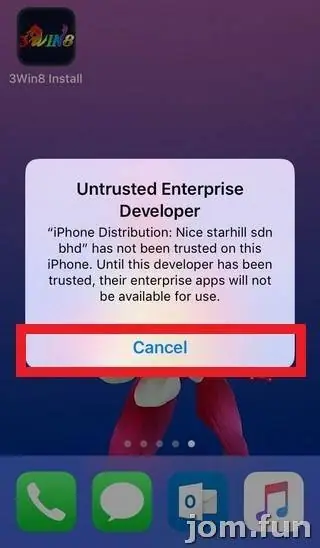
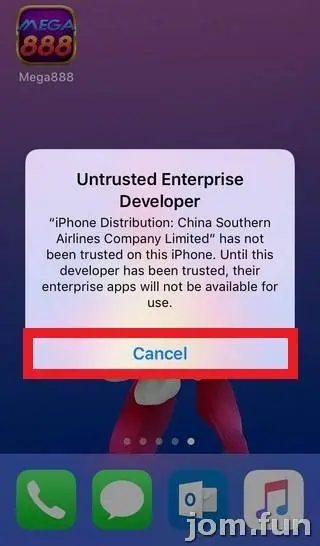
Look at the screenshot at the top. The developer your iPhone asks you to trust, in this install, is China Southern Airlines Company Limited.
Yes, the airline. Mega888 obviously isn't made by an airline. Enterprise certificates are meant for a company's own staff apps, and ones like this end up signing gambling apps because they've been leaked, resold or misused. Apple revokes them when it notices, which is why Mega888 on iPhone breaks every so often.
I'm not saying don't install it. I'm saying understand what the Trust button means here: you're letting any app signed by whoever holds that certificate run on your phone.
Steps as they looked
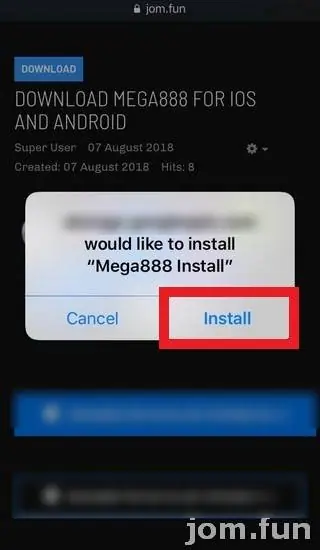
- Open the iPhone link your provider gave you. Safari asks to install "Mega888 Install". Tap Install.
- Tap the new Mega888 icon. You'll get Untrusted Enterprise Developer, naming the airline. Tap Cancel.
- Go to Settings > General > Device Management (newer iOS: VPN & Device Management). The name is already greyed out beside the row.
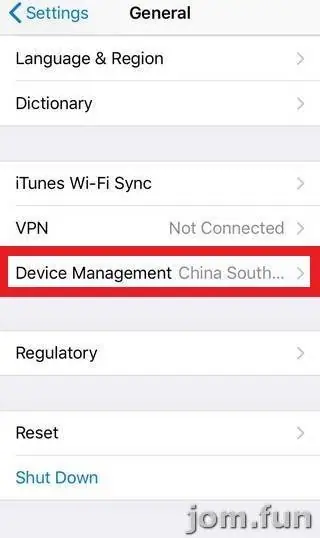
- Tap the company under Enterprise App, then the blue Trust "China Southern Airlines Com..." link. Mega888 is listed below as Verified.
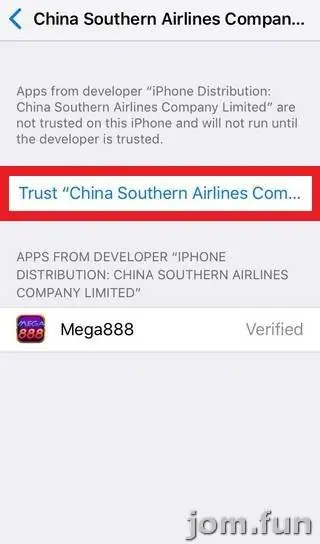
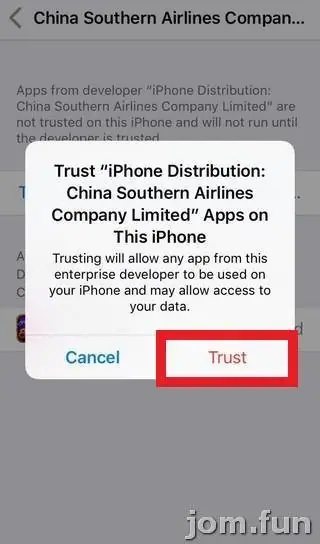
- Confirm Trust, then open Mega888 and log in with the ID and password from your provider.
After it works
Keep iOS updated. Don't reuse your email or banking password as your Mega888 password. And never read out a bank TAC to anyone who says they're "helping with your top-up". A real provider never needs it.
When Mega888 stops opening, delete it, get a fresh link and repeat the steps. The certificate name will probably be different next time.
More on the platform is on the Mega888 overview, and individual slots such as God of Wealth and Golden Lotus are in the Mega888 game sheet. If you need an account, get a Mega888 game ID.
Mega888 is for adults 18 and over, and online gambling is restricted in Malaysia. Decide what you can afford to lose before you log in; the responsible gaming page has tools for sticking to it.
Questions people ask
Which Mega888 iPhone build do I need?
The 64-bit one. iOS 11 and later cannot run 32-bit apps at all, and every iPhone from the 5s onwards is 64-bit.
Why does an airline name appear when I install Mega888?
The build in these screenshots was signed with an enterprise certificate issued in that company's name. The airline has nothing to do with Mega888; it's a sign of how loosely these certificates get used.
Real-money games; online gambling is restricted in Malaysia. Never top up money you need, and stop if it stops being fun. Responsible gaming.