App install notes · Install notes
Pussy888 on Android, and what Chrome's warning means
Chrome says your phone isn't allowed to install unknown apps from this source. Here's what that screen is protecting, and how to get past it for one app only.
"For your security, your phone is not allowed to install unknown apps from this source."
That's Chrome talking, and it's the first thing you'll see when you open a Pussy888 APK on Android. It isn't an error. Android blocks apps from outside Google Play by default, and it makes you give permission app by app: this time, to Chrome.
The screenshots below come from the old guide, on an Android phone running Chrome 73. Newer phones word things slightly differently, but the order hasn't changed.
The four screens
- Open the APK your provider sent you. Chrome shows the block above. Tap Settings.
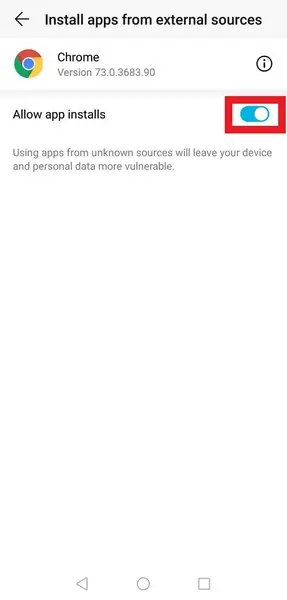
- You land on Install apps from external sources for Chrome. Flip Allow app installs on.
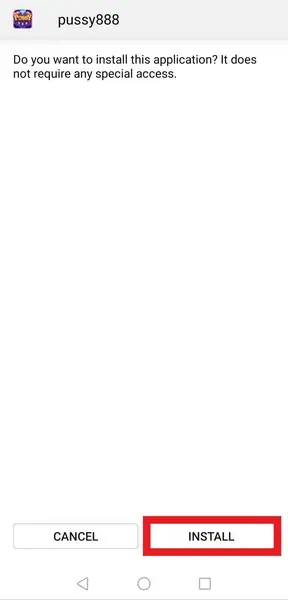
- Go back. Android now asks: "Do you want to install this application? It does not require any special access." Tap Install.
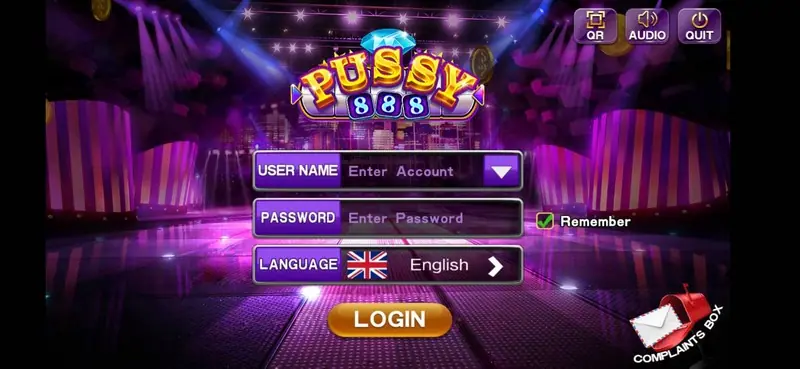
- Open the app. You get the login screen: User Name, Password, a Remember tick, a Language row set to English, and a gold Login button.
The line people skip
Look at the small grey text under that switch in step 2: using apps from unknown sources "will leave your device and personal data more vulnerable." That's accurate. While the switch is on, any website Chrome opens can hand you an APK and you're one tap from installing it. So go back and switch it off as soon as Pussy888 is installed. You can always turn it on again for the next update.
The "does not require any special access" line in step 3 is a good sign, by the way. If a build you're given asks for SMS, contacts, accessibility or device admin, cancel. A slot app has no use for any of that, and those permissions are what banking-trojan apps ask for to read your TAC codes.
After login, the lobby has a big Grand Bonus counter up top and tabs for Online Games, Hot, New, Fish, Table, Arcade and Slots along the bottom.

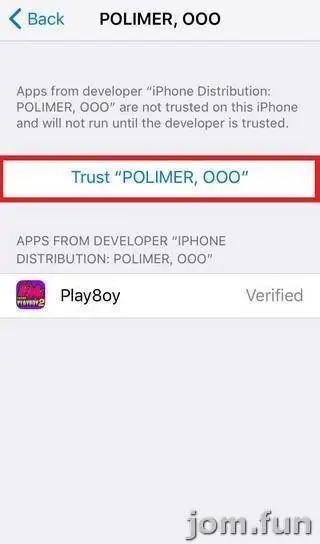
The old page also had an iPhone build that needed the usual Trust step under Settings > General > VPN & Device Management; no screenshots of it survived. Other platforms' install notes are on the app install notes hub, and if you need a game ID and a current link, ask the provider we work with.
Please remember this is 18+ only and online gambling is restricted in Malaysia. Put a cap on what you spend before you open the app; responsible gaming explains a few ways.
Questions people ask
Should I leave 'Allow app installs' on for Chrome?
No. Turn it on for the one install, then switch it off. Left on, any page you visit can push an APK at you.
Does Pussy888 have a page on this guide?
Not at the moment. This page only covers how the install worked.
Real-money games; online gambling is restricted in Malaysia. Never top up money you need, and stop if it stops being fun. Responsible gaming.